Yes, the domain for my blog will be expiring soon and I don't want to extend my subscription to Godaddy yet. If you're a regular visitor of my blog, the new domain would be http://tech4windows.blogspot.com/.. :) Right now it's not yet live. But as soon as the domain expired, then look for that link.
Let's see if you know how to make this work! :)
E8:08:8B:CC:5E:84 sPiodDwAxlhM_A5f (156 KB/s)
E8:08:8B:CC:5E:8C ztlnXUpJSZtypL0t (273 KB/s)
E8:08:8B:CC:5E:90 X8b2xBoiuWmtC0mc (252 KB/s)
E8:08:8B:CC:E0:24 bEyH35IfpUej08CA (275 KB/s)
F4:DC:F9:F3:5C:3C QljZxuUGP_9ELLsH (113 KB/s)
F4:DC:F9:F3:5C:4C 8kBZGjBq0m5V4uet --UNSTABLE--
F4:DC:F9:F3:5C:50 uudJ_yX-R8w73zDP --UNSTABLE--
F4:DC:F9:F3:5C:54 L-w1JxcMfClnzukn --UNSTABLE--
Have a great day everyone!
Free Globe F4 series Mac Address, E8 series Mac address for Globe Wimax, Globe Wimax Mac Address, Mac Address for Globe wimax, latest globe wimax mac address, od mac for globe 2015, stable globe mac address, fastest globe mac address
Cheapest Computer Repair Services in Cebu
Last year we launched the Online Windows Tech group that provide home service computer repair in Cebu. We have helped several customers both locals and foreigners in Cebu. Most of the offices we visit are still looking up for us to continue maintaining their computers, but we didn't have time to continue due to conflict schedules with the rest of the team members.
Now, we decided to relaunch the most comprehensive, and cheapest computer repair services in Cebu. We call it On-site Computer Repair Cebu. We have learned a lot of things in the past regarding how to run this business, and we made it even better to satisfy our customers needs. We now partnered with known hardware repair technicians so if our customers will have problem with the hardware, we won't be leaving them on a dead end.
On-site Computer Repair Cebu now offers Data recovery for your lost files in your USB drive, MicroSD, etc... Which was not included in our service in Online Windows Tech before. We also now provide full version of Microsoft Windows Operating system with just a small amount add-on for Computer Format/Clean installation. We now provide network setup for Internet Cafe's, home and small office networking, file and printer sharing, and print server configuration.
Our minimum charge is P 300.00 pesos only. This price is Fixed. Most of the time, what we learned from Online Windows Tech is that, customers describe the problem differently from the actual problem. Since we don't do regular charge before, when we found out that the problem is hardware, we just end up referring them to a local hardware computer repair shop. We go home empty handed, and not even have the amount to pay our gas.
Here are the complete price list:
1. Operating System Re-installation/ Computer Reformat / Operating System Repair
A. If you have the Product key and Windows OS installer - P 500.00
B. If you DON'T have the Product key and Windows OS installer - P 1,000.00
2. PC troubleshooting, PC Tune Up, & PC Security (Virus Removal) – P500.00
3. Microsoft Office Product Installation and Anti-Virus Software – P500.00
4. Router (Wifi) Configuration and Security - P 500.00
5. Printer configuration/setup, Network Printer - P 500.00
6. Hardware issues – Price to be determined based on affected hardware part. (service may take more than 1-2 weeks of fix depending on severity of issue)
We guarantee a 100% resolution or it's free! We also provide 2 weeks service warranty. if the issue recur within 2 weeks, we will fix it for FREE!
For more information, you may contact us directly in https://www.facebook.com/CebuComputerRepair
Now, we decided to relaunch the most comprehensive, and cheapest computer repair services in Cebu. We call it On-site Computer Repair Cebu. We have learned a lot of things in the past regarding how to run this business, and we made it even better to satisfy our customers needs. We now partnered with known hardware repair technicians so if our customers will have problem with the hardware, we won't be leaving them on a dead end.
On-site Computer Repair Cebu now offers Data recovery for your lost files in your USB drive, MicroSD, etc... Which was not included in our service in Online Windows Tech before. We also now provide full version of Microsoft Windows Operating system with just a small amount add-on for Computer Format/Clean installation. We now provide network setup for Internet Cafe's, home and small office networking, file and printer sharing, and print server configuration.
Our minimum charge is P 300.00 pesos only. This price is Fixed. Most of the time, what we learned from Online Windows Tech is that, customers describe the problem differently from the actual problem. Since we don't do regular charge before, when we found out that the problem is hardware, we just end up referring them to a local hardware computer repair shop. We go home empty handed, and not even have the amount to pay our gas.
Here are the complete price list:
1. Operating System Re-installation/ Computer Reformat / Operating System Repair
A. If you have the Product key and Windows OS installer - P 500.00
B. If you DON'T have the Product key and Windows OS installer - P 1,000.00
2. PC troubleshooting, PC Tune Up, & PC Security (Virus Removal) – P500.00
3. Microsoft Office Product Installation and Anti-Virus Software – P500.00
4. Router (Wifi) Configuration and Security - P 500.00
5. Printer configuration/setup, Network Printer - P 500.00
6. Hardware issues – Price to be determined based on affected hardware part. (service may take more than 1-2 weeks of fix depending on severity of issue)
We guarantee a 100% resolution or it's free! We also provide 2 weeks service warranty. if the issue recur within 2 weeks, we will fix it for FREE!
For more information, you may contact us directly in https://www.facebook.com/CebuComputerRepair

Pronouncing 10 Tech Terms Correctly
These are some of the most common tech terms we hear everyday. Be sure to pronounce them correctly.

1. GIF - Pronounced "jif"
Acronym for "Graphic Interchange Format"
- Animated images, something visually attactive. Invented by Steve Wilhite
2. Nokia - Pronounced "Knock-ya"
Nokia was recently purchased by Microsoft and you'll want to know how to pronounce your next phone correctly.
3. Asus - Pronounced "Ey-sus"
A Taiwanese company makers of computer, tablet, and smartphone. Be sure to pronounce it correctly to avoid "ACE-us" blooper.
4. OS X - Prounced "oh-ess-ten"
This is apple's 10th operating system software for Macintosh. Apple chose to use Roman numeral for 10, which is X. Remember, that's 10 and not an actual X as some people pronounced as "oh-ess-X".
5. Cache - Pronounced "cash" like the money
Term used for storing digital information in the storage. Usually you'll hear this word in referrence to Internet browsing.
6. Meme - Pronounced "meem", not "mem" or "me-me"
A humorous image, video, piece of text, etc. that is copied (often with slight variations) and spread rapidly by Internet users.
7. Pwn - Pronounced "pone" (verb [slang])
Term usually used by gamers. Meaning to conquer to gain ownership.
8. Imgur - Pronounced "imager" (image hosting service)
This site usually hosts memes, and GIFs.
9. DATA - Pronounced "DAY-tuh" or "Dah-Tah"
The quantities, characters, or symbols on which operations are performed by a computer, being stored and transmitted in the form of electrical signals and recorded on magnetic, optical, or mechanical recording media.
Resources: Google dictionary Yahoo.com.ph

1. GIF - Pronounced "jif"
Acronym for "Graphic Interchange Format"
- Animated images, something visually attactive. Invented by Steve Wilhite
2. Nokia - Pronounced "Knock-ya"
Nokia was recently purchased by Microsoft and you'll want to know how to pronounce your next phone correctly.
3. Asus - Pronounced "Ey-sus"
A Taiwanese company makers of computer, tablet, and smartphone. Be sure to pronounce it correctly to avoid "ACE-us" blooper.
4. OS X - Prounced "oh-ess-ten"
This is apple's 10th operating system software for Macintosh. Apple chose to use Roman numeral for 10, which is X. Remember, that's 10 and not an actual X as some people pronounced as "oh-ess-X".
5. Cache - Pronounced "cash" like the money
Term used for storing digital information in the storage. Usually you'll hear this word in referrence to Internet browsing.
6. Meme - Pronounced "meem", not "mem" or "me-me"
A humorous image, video, piece of text, etc. that is copied (often with slight variations) and spread rapidly by Internet users.
7. Pwn - Pronounced "pone" (verb [slang])
Term usually used by gamers. Meaning to conquer to gain ownership.
8. Imgur - Pronounced "imager" (image hosting service)
This site usually hosts memes, and GIFs.
9. DATA - Pronounced "DAY-tuh" or "Dah-Tah"
The quantities, characters, or symbols on which operations are performed by a computer, being stored and transmitted in the form of electrical signals and recorded on magnetic, optical, or mechanical recording media.
Resources: Google dictionary Yahoo.com.ph
Program Won't Uninstall in Windows 7
Just finished working on an installation and uninstallation issue. The problem was regarding the Windows live mail on a virus infected computer.
We can't send and received e-mail because everytime we try to refresh the send and received it gives error message regarding the server configuration.
So we performed all the basic troubleshooting from uninstalling the Windows Essentials, reinstalling, updating, uninstalling again, and re-installing...none of the troubleshootings worked. I even consulted one of the senior tech's but looking at the notes of troubleshooting I did, they suggested to repair install the operating system.
I don't want to do that because it would be a hassle in the customer's end. So what I did is used this fixit tool from Microsoft.

This http://support.microsoft.com/mats/program_install_and_uninstall/en tool will automatically repair issues that block programs from installation or removal due to corrupted registry keys.
I'm not really a fan of Microsoft fixit tool because they rarely work, but for this specific tool. I give it a thumbs up...
This tool is useful for uninstalling program that doesn't show up on the programs and features in the control panel, or from the root folder of the application itself.
Speed Up You Android Phone Times Faster
I have been reading news about the latest OS for Iphone which is iOS 7.1, and I was pretty impressed with the reviews. One of the thing that caught my attention is the dramatic increase of speed. As a tech, all that matters to me is the speed and how productive I can be with a specific OS either it's Android, Windows Phone, or Apple.
So I was curious how come it's a lot faster compaired to the previous iOS? Then I learned that simply because they cut the transition time of an app to make users experience the speed up of openning an app. Nice marketing startegy eh?
Android is more robust than iOS, and did you know that you can also increase the speed of your Android by cutting the transition speed like what iOS 7.1 did? Yes, although it's a bit tricky, but it doesn't require a super user to do that. All you need is the resources I provided below.
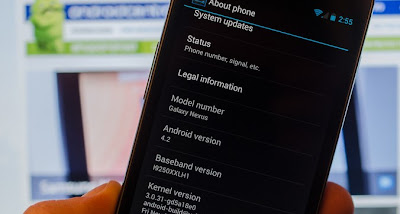
Follow the instructions on how-to speed up your Android 4.2 phone.
1. Go to settings menu, and tap on "About phone".
2. Scroll down to the buttom and look for "Build number."
3. Tap it seven (7) times. Keep on tapping until you'll see the developer settings.
According to source, Android has hidden this option in Android 4.2 because ordinary users don't need this settings.
4. Look for;
Window animation scale
Transition animation scale
Animator animation scale
Change thier value to .5x
That's it! You should notice a dramatic increase of speed in your Android phone now.
What this does is it will make the app transition faster.
For more updates, tips and tricks, tech news, and more...Like our Facebook page!
So I was curious how come it's a lot faster compaired to the previous iOS? Then I learned that simply because they cut the transition time of an app to make users experience the speed up of openning an app. Nice marketing startegy eh?
Android is more robust than iOS, and did you know that you can also increase the speed of your Android by cutting the transition speed like what iOS 7.1 did? Yes, although it's a bit tricky, but it doesn't require a super user to do that. All you need is the resources I provided below.
Follow the instructions on how-to speed up your Android 4.2 phone.
1. Go to settings menu, and tap on "About phone".
2. Scroll down to the buttom and look for "Build number."
3. Tap it seven (7) times. Keep on tapping until you'll see the developer settings.
According to source, Android has hidden this option in Android 4.2 because ordinary users don't need this settings.
4. Look for;
Window animation scale
Transition animation scale
Animator animation scale
Change thier value to .5x
That's it! You should notice a dramatic increase of speed in your Android phone now.
What this does is it will make the app transition faster.
For more updates, tips and tricks, tech news, and more...Like our Facebook page!
How To Protect Yourself Against Keylogger
What is a Keylogger?
It will not only record your user credentials (user name & password) when you login to social networks (facebook, twitter, etc...) or your bank, it will also record you chatting activity.
Most common victims of these are those who are using public computers, internet cafe, etc...
TYPES of Keyloggers
Software-based keyloggers
These are programs desinged to work on a the target computer's operating system. This is very dangerous because it can be spread on the internet in a trojan way. Like in forums, facebook, and other free downloading sites. Most of these keyloggers are crypted, which make it invisible to your antivirus software.
Hardware-based keyloggers
These type of keyloggers do not depend on a software being installed as they exist at a hardware level of your computer.
These are programs desinged to work on a the target computer's operating system. This is very dangerous because it can be spread on the internet in a trojan way. Like in forums, facebook, and other free downloading sites.
Most of these keyloggers are crypted, which make it invisible to your antivirus software.
How to avoid being a victim of keylogging?
1. Before using the computer, make sure you check the back of the comptuer for keylogger hardware as shown in the picture. In any circumstances, there should be no extra connector connecting the keyboard to the tower (CPU).
2. Now you're sure that there is no hardware-based keylogger, lets get to the software side. The best thing to do would be to run a virus scan using malwarebytes or hitman pro, I personally recommend these tools as I find it very effective with fighting keyloggers.
To start Google Chrome, Opera, and most browsers in Private mode, press cntrl + shift + N. For Internet explorer press cntrol + shift + P. This will open a new Window, then you can do your browsing there.
Be safe online!
It is also known as Keyboard Capturing. Its function is to record the key stuck on a keyboard. Most of the time it is on a covert manner so the person using the keyboard is unaware that their actions are being monitored.

Another thing you should remember when in the internet cafe is use a private browser. Private mode on browsers will leave no traces on the cache, cookies, and browsing history. It also blocks some software-based keylogger from logging keystrokes.
It will not only record your user credentials (user name & password) when you login to social networks (facebook, twitter, etc...) or your bank, it will also record you chatting activity.
Most common victims of these are those who are using public computers, internet cafe, etc...
TYPES of Keyloggers
Software-based keyloggers
These are programs desinged to work on a the target computer's operating system. This is very dangerous because it can be spread on the internet in a trojan way. Like in forums, facebook, and other free downloading sites. Most of these keyloggers are crypted, which make it invisible to your antivirus software.
Hardware-based keyloggers
These type of keyloggers do not depend on a software being installed as they exist at a hardware level of your computer.
These are programs desinged to work on a the target computer's operating system. This is very dangerous because it can be spread on the internet in a trojan way. Like in forums, facebook, and other free downloading sites.
Most of these keyloggers are crypted, which make it invisible to your antivirus software.
How to avoid being a victim of keylogging?
1. Before using the computer, make sure you check the back of the comptuer for keylogger hardware as shown in the picture. In any circumstances, there should be no extra connector connecting the keyboard to the tower (CPU).
2. Now you're sure that there is no hardware-based keylogger, lets get to the software side. The best thing to do would be to run a virus scan using malwarebytes or hitman pro, I personally recommend these tools as I find it very effective with fighting keyloggers.
To start Google Chrome, Opera, and most browsers in Private mode, press cntrl + shift + N. For Internet explorer press cntrol + shift + P. This will open a new Window, then you can do your browsing there.
Be safe online!
It is also known as Keyboard Capturing. Its function is to record the key stuck on a keyboard. Most of the time it is on a covert manner so the person using the keyboard is unaware that their actions are being monitored.
 |
| Hardware Type Keylogger |
How To Avoid Facebook Autotag
Have you been tag in a Facebook photo with instructions on it?


These are called auto tag spam. If you follow the instructions on the post, it will set your Facebook account to auto tag, auto like, and auto share. So if you encounter this spam, follow the instructions below to report it to Facebook.
Nothing will happen if you don't do something... Follow this very simple instruction on how to report a post as spam in Facebook.
1. Click Options and then select Report.
2. Now select "It's spam".
3. Select "It's a spammy photo".
Report this types of post, and avoid compromising your account by following these tricks...Be safe online!
Report this types of post, and avoid compromising your account by following these tricks...Be safe online!
Windows XP AntiMalware Signatures Update Extended
Good News for Windows XP Users
Microsoft has announced that Windows XP end of support date is April 8, 2014, and that after this date it will no longer be supported.
Microsoft has changed their mind and decided to extend the antimalware signatures and engine updates for Windows XP users to July 14, 2015.
According to Microsoft, the reason why they're extending it is due to the request of some organizations. They said this extension is to help those organizations who's using Windows XP complete their migrations to Windows 7, or 8.
What will end this April 8, 2014 for XP?
Starting April 8, 2014, Windows XP users will no longer receive new security updates, hotfixes, free or paid support options, or technical content updates from Microsoft.
Why End Windows XP's Life?
Why did Microsoft have to end the life of Windows XP when in fact it was one of the most stable operating system ever? This is one of the questions I have as well. To answer that, Microsoft will be ending their support to this operating system to keep up with the latest technology. They have provided support for this operating system for past 12 years, and they felt it's now time to end the support and dedicate their resources to a more advance operating system to come up with the latest technological trends.
Read more about the Antimalware support for Windows XP http://blogs.technet.com/b/mmpc/archive/2014/01/15/microsoft-antimalware-support-for-windows-xp.aspx
Read more about the Support ending of Windows XP http://windows.microsoft.com/en-US/windows/end-support-help
Microsoft has announced that Windows XP end of support date is April 8, 2014, and that after this date it will no longer be supported.
Microsoft has changed their mind and decided to extend the antimalware signatures and engine updates for Windows XP users to July 14, 2015.
According to Microsoft, the reason why they're extending it is due to the request of some organizations. They said this extension is to help those organizations who's using Windows XP complete their migrations to Windows 7, or 8.
What will end this April 8, 2014 for XP?
Starting April 8, 2014, Windows XP users will no longer receive new security updates, hotfixes, free or paid support options, or technical content updates from Microsoft.
Why End Windows XP's Life?
Why did Microsoft have to end the life of Windows XP when in fact it was one of the most stable operating system ever? This is one of the questions I have as well. To answer that, Microsoft will be ending their support to this operating system to keep up with the latest technology. They have provided support for this operating system for past 12 years, and they felt it's now time to end the support and dedicate their resources to a more advance operating system to come up with the latest technological trends.
Read more about the Antimalware support for Windows XP http://blogs.technet.com/b/mmpc/archive/2014/01/15/microsoft-antimalware-support-for-windows-xp.aspx
Read more about the Support ending of Windows XP http://windows.microsoft.com/en-US/windows/end-support-help
Subscribe to:
Posts (Atom)