These are some of the most common tech terms we hear everyday. Be sure to pronounce them correctly.
1. GIF - Pronounced "jif"
Acronym for "Graphic Interchange Format"
- Animated images, something visually attactive. Invented by Steve Wilhite
2. Nokia - Pronounced "Knock-ya"
Nokia was recently purchased by Microsoft and you'll want to know how to pronounce your next phone correctly.
3. Asus - Pronounced "Ey-sus"
A Taiwanese company makers of computer, tablet, and smartphone. Be sure to pronounce it correctly to avoid "ACE-us" blooper.
4. OS X - Prounced "oh-ess-ten"
This is apple's 10th operating system software for Macintosh. Apple chose to use Roman numeral for 10, which is X. Remember, that's 10 and not an actual X as some people pronounced as "oh-ess-X".
5. Cache - Pronounced "cash" like the money
Term used for storing digital information in the storage. Usually you'll hear this word in referrence to Internet browsing.
6. Meme - Pronounced "meem", not "mem" or "me-me"
A humorous image, video, piece of text, etc. that is copied (often with slight variations) and spread rapidly by Internet users.
7. Pwn - Pronounced "pone" (verb [slang])
Term usually used by gamers. Meaning to conquer to gain ownership.
8. Imgur - Pronounced "imager" (image hosting service)
This site usually hosts memes, and GIFs.
9. DATA - Pronounced "DAY-tuh" or "Dah-Tah"
The quantities, characters, or symbols on which operations are performed by a computer, being stored and transmitted in the form of electrical signals and recorded on magnetic, optical, or mechanical recording media.
Resources: Google dictionary Yahoo.com.ph
Technical tips about printers, computers, smart phones and computer reviews. Windows Update issues, virus removal, and more...
Program Won't Uninstall in Windows 7
Just finished working on an installation and uninstallation issue. The problem was regarding the Windows live mail on a virus infected computer.
We can't send and received e-mail because everytime we try to refresh the send and received it gives error message regarding the server configuration.
So we performed all the basic troubleshooting from uninstalling the Windows Essentials, reinstalling, updating, uninstalling again, and re-installing...none of the troubleshootings worked. I even consulted one of the senior tech's but looking at the notes of troubleshooting I did, they suggested to repair install the operating system.
I don't want to do that because it would be a hassle in the customer's end. So what I did is used this fixit tool from Microsoft.
This http://support.microsoft.com/mats/program_install_and_uninstall/en tool will automatically repair issues that block programs from installation or removal due to corrupted registry keys.
I'm not really a fan of Microsoft fixit tool because they rarely work, but for this specific tool. I give it a thumbs up...
This tool is useful for uninstalling program that doesn't show up on the programs and features in the control panel, or from the root folder of the application itself.
Speed Up You Android Phone Times Faster
I have been reading news about the latest OS for Iphone which is iOS 7.1, and I was pretty impressed with the reviews. One of the thing that caught my attention is the dramatic increase of speed. As a tech, all that matters to me is the speed and how productive I can be with a specific OS either it's Android, Windows Phone, or Apple.
So I was curious how come it's a lot faster compaired to the previous iOS? Then I learned that simply because they cut the transition time of an app to make users experience the speed up of openning an app. Nice marketing startegy eh?
Android is more robust than iOS, and did you know that you can also increase the speed of your Android by cutting the transition speed like what iOS 7.1 did? Yes, although it's a bit tricky, but it doesn't require a super user to do that. All you need is the resources I provided below.

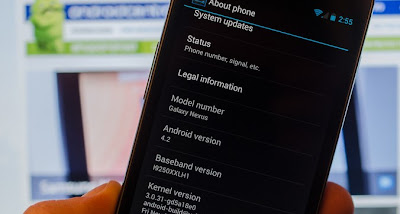
Follow the instructions on how-to speed up your Android 4.2 phone.
1. Go to settings menu, and tap on "About phone".
2. Scroll down to the buttom and look for "Build number."
3. Tap it seven (7) times. Keep on tapping until you'll see the developer settings.
According to source, Android has hidden this option in Android 4.2 because ordinary users don't need this settings.
4. Look for;
Window animation scale
Transition animation scale
Animator animation scale
Change thier value to .5x
That's it! You should notice a dramatic increase of speed in your Android phone now.
What this does is it will make the app transition faster.
For more updates, tips and tricks, tech news, and more...Like our Facebook page!
So I was curious how come it's a lot faster compaired to the previous iOS? Then I learned that simply because they cut the transition time of an app to make users experience the speed up of openning an app. Nice marketing startegy eh?
Android is more robust than iOS, and did you know that you can also increase the speed of your Android by cutting the transition speed like what iOS 7.1 did? Yes, although it's a bit tricky, but it doesn't require a super user to do that. All you need is the resources I provided below.

Follow the instructions on how-to speed up your Android 4.2 phone.
1. Go to settings menu, and tap on "About phone".
2. Scroll down to the buttom and look for "Build number."
3. Tap it seven (7) times. Keep on tapping until you'll see the developer settings.
According to source, Android has hidden this option in Android 4.2 because ordinary users don't need this settings.
4. Look for;
Window animation scale
Transition animation scale
Animator animation scale
Change thier value to .5x
That's it! You should notice a dramatic increase of speed in your Android phone now.
What this does is it will make the app transition faster.
For more updates, tips and tricks, tech news, and more...Like our Facebook page!
How To Protect Yourself Against Keylogger
What is a Keylogger?
It will not only record your user credentials (user name & password) when you login to social networks (facebook, twitter, etc...) or your bank, it will also record you chatting activity.
Most common victims of these are those who are using public computers, internet cafe, etc...
TYPES of Keyloggers
Software-based keyloggers
These are programs desinged to work on a the target computer's operating system. This is very dangerous because it can be spread on the internet in a trojan way. Like in forums, facebook, and other free downloading sites. Most of these keyloggers are crypted, which make it invisible to your antivirus software.
Hardware-based keyloggers
These type of keyloggers do not depend on a software being installed as they exist at a hardware level of your computer.
These are programs desinged to work on a the target computer's operating system. This is very dangerous because it can be spread on the internet in a trojan way. Like in forums, facebook, and other free downloading sites.
Most of these keyloggers are crypted, which make it invisible to your antivirus software.
How to avoid being a victim of keylogging?
1. Before using the computer, make sure you check the back of the comptuer for keylogger hardware as shown in the picture. In any circumstances, there should be no extra connector connecting the keyboard to the tower (CPU).
2. Now you're sure that there is no hardware-based keylogger, lets get to the software side. The best thing to do would be to run a virus scan using malwarebytes or hitman pro, I personally recommend these tools as I find it very effective with fighting keyloggers.
To start Google Chrome, Opera, and most browsers in Private mode, press cntrl + shift + N. For Internet explorer press cntrol + shift + P. This will open a new Window, then you can do your browsing there.
Be safe online!
It is also known as Keyboard Capturing. Its function is to record the key stuck on a keyboard. Most of the time it is on a covert manner so the person using the keyboard is unaware that their actions are being monitored.
Another thing you should remember when in the internet cafe is use a private browser. Private mode on browsers will leave no traces on the cache, cookies, and browsing history. It also blocks some software-based keylogger from logging keystrokes.
It will not only record your user credentials (user name & password) when you login to social networks (facebook, twitter, etc...) or your bank, it will also record you chatting activity.
Most common victims of these are those who are using public computers, internet cafe, etc...
TYPES of Keyloggers
Software-based keyloggers
These are programs desinged to work on a the target computer's operating system. This is very dangerous because it can be spread on the internet in a trojan way. Like in forums, facebook, and other free downloading sites. Most of these keyloggers are crypted, which make it invisible to your antivirus software.
Hardware-based keyloggers
These type of keyloggers do not depend on a software being installed as they exist at a hardware level of your computer.
These are programs desinged to work on a the target computer's operating system. This is very dangerous because it can be spread on the internet in a trojan way. Like in forums, facebook, and other free downloading sites.
Most of these keyloggers are crypted, which make it invisible to your antivirus software.
How to avoid being a victim of keylogging?
1. Before using the computer, make sure you check the back of the comptuer for keylogger hardware as shown in the picture. In any circumstances, there should be no extra connector connecting the keyboard to the tower (CPU).
2. Now you're sure that there is no hardware-based keylogger, lets get to the software side. The best thing to do would be to run a virus scan using malwarebytes or hitman pro, I personally recommend these tools as I find it very effective with fighting keyloggers.
To start Google Chrome, Opera, and most browsers in Private mode, press cntrl + shift + N. For Internet explorer press cntrol + shift + P. This will open a new Window, then you can do your browsing there.
Be safe online!
It is also known as Keyboard Capturing. Its function is to record the key stuck on a keyboard. Most of the time it is on a covert manner so the person using the keyboard is unaware that their actions are being monitored.
![]() |
| Hardware Type Keylogger |
How To Avoid Facebook Autotag
Have you been tag in a Facebook photo with instructions on it?
These are called auto tag spam. If you follow the instructions on the post, it will set your Facebook account to auto tag, auto like, and auto share. So if you encounter this spam, follow the instructions below to report it to Facebook.
Nothing will happen if you don't do something... Follow this very simple instruction on how to report a post as spam in Facebook.
1. Click Options and then select Report.
2. Now select "It's spam".
3. Select "It's a spammy photo".
Report this types of post, and avoid compromising your account by following these tricks...Be safe online!
Windows XP AntiMalware Signatures Update Extended
Good News for Windows XP Users
Microsoft has announced that Windows XP end of support date is April 8, 2014, and that after this date it will no longer be supported.
Microsoft has changed their mind and decided to extend the antimalware signatures and engine updates for Windows XP users to July 14, 2015.
According to Microsoft, the reason why they're extending it is due to the request of some organizations. They said this extension is to help those organizations who's using Windows XP complete their migrations to Windows 7, or 8.
What will end this April 8, 2014 for XP?
Starting April 8, 2014, Windows XP users will no longer receive new security updates, hotfixes, free or paid support options, or technical content updates from Microsoft.
Why End Windows XP's Life?
Why did Microsoft have to end the life of Windows XP when in fact it was one of the most stable operating system ever? This is one of the questions I have as well. To answer that, Microsoft will be ending their support to this operating system to keep up with the latest technology. They have provided support for this operating system for past 12 years, and they felt it's now time to end the support and dedicate their resources to a more advance operating system to come up with the latest technological trends.
Read more about the Antimalware support for Windows XP http://blogs.technet.com/b/mmpc/archive/2014/01/15/microsoft-antimalware-support-for-windows-xp.aspx
Read more about the Support ending of Windows XP http://windows.microsoft.com/en-US/windows/end-support-help
Microsoft has announced that Windows XP end of support date is April 8, 2014, and that after this date it will no longer be supported.
Microsoft has changed their mind and decided to extend the antimalware signatures and engine updates for Windows XP users to July 14, 2015.
According to Microsoft, the reason why they're extending it is due to the request of some organizations. They said this extension is to help those organizations who's using Windows XP complete their migrations to Windows 7, or 8.
What will end this April 8, 2014 for XP?
Starting April 8, 2014, Windows XP users will no longer receive new security updates, hotfixes, free or paid support options, or technical content updates from Microsoft.
Why End Windows XP's Life?
Why did Microsoft have to end the life of Windows XP when in fact it was one of the most stable operating system ever? This is one of the questions I have as well. To answer that, Microsoft will be ending their support to this operating system to keep up with the latest technology. They have provided support for this operating system for past 12 years, and they felt it's now time to end the support and dedicate their resources to a more advance operating system to come up with the latest technological trends.
Read more about the Antimalware support for Windows XP http://blogs.technet.com/b/mmpc/archive/2014/01/15/microsoft-antimalware-support-for-windows-xp.aspx
Read more about the Support ending of Windows XP http://windows.microsoft.com/en-US/windows/end-support-help
Steps in Resetting Computer Bios Password
What is Bios Password?
Bios password is a specific feature for your computer's mother board. This is specifically helpful if you are running an internet cafe and you don't want anyone to make changes or format your computer.
Downside
If you forget your BIOS password, then it's over. Specially if your computer won't boot into the operating system.
How to reset BIOS Password?
There are 2 popular methods of resetting BIOS password. It can be by using a BIOS reset jumper, or taking out the CMOS battery for a few seconds. However, taking out the CMOS battery from the motherboard would require you to open your computer tower. This might not be the best solution for you specially if you're on a laptop. "So what should I do?" keep reading...
There is of course a way to reset your BIOS password without the hassle of dissecting your computer. The software you need is the "CMOS De-Animator".
"CMOS De-Animator" software allows you to reset and clear your system's BIOS settings and removing the BIOS Password. It works by invalidating the checksum of your CMOS memory. It saves you from openning your computer and finding the reset jumper or CMOS battery.
However, each software has a downside or cons. The downside for this software is you can only use it if you're login to the computer as an Administrator. So if you just got a computer and you don't know the user admin password and BIOS password, then you should keep looking for a different option.
How to use the CMOS-De Animator software? Follow the steps below;
1. Right click on the tool and run it as administrator.
2. Restart the computer.
When the computer starts, you will see a CMOS checksum error and then it will allow you to access the BIOS without a password.
I cannot post the download link in this blog due to Ad policy so feel free to use our friend google.
Bios password is a specific feature for your computer's mother board. This is specifically helpful if you are running an internet cafe and you don't want anyone to make changes or format your computer.
Downside
If you forget your BIOS password, then it's over. Specially if your computer won't boot into the operating system.
How to reset BIOS Password?
There are 2 popular methods of resetting BIOS password. It can be by using a BIOS reset jumper, or taking out the CMOS battery for a few seconds. However, taking out the CMOS battery from the motherboard would require you to open your computer tower. This might not be the best solution for you specially if you're on a laptop. "So what should I do?" keep reading...
There is of course a way to reset your BIOS password without the hassle of dissecting your computer. The software you need is the "CMOS De-Animator".
"CMOS De-Animator" software allows you to reset and clear your system's BIOS settings and removing the BIOS Password. It works by invalidating the checksum of your CMOS memory. It saves you from openning your computer and finding the reset jumper or CMOS battery.
However, each software has a downside or cons. The downside for this software is you can only use it if you're login to the computer as an Administrator. So if you just got a computer and you don't know the user admin password and BIOS password, then you should keep looking for a different option.
How to use the CMOS-De Animator software? Follow the steps below;
1. Right click on the tool and run it as administrator.
2. Restart the computer.
When the computer starts, you will see a CMOS checksum error and then it will allow you to access the BIOS without a password.
I cannot post the download link in this blog due to Ad policy so feel free to use our friend google.
Fixit Windows Issue With Uninstall and Reinstalling a Program
Just finished working on a Windows live mail installation issue. The problem was regarding the Windows live mail on a virus infected computer.
We can't send and received e-mail because every time we try to refresh the send and received it gives error message regarding the server configuration.
So we performed all the basic troubleshooting from uninstalling the Windows Essentials, re-installing, updating, uninstalling again, and re-installing...none of the troubleshooting worked. I even consulted one of the senior tech's but looking at the notes of troubleshooting I did, they suggested to repair install the operating system.
I don't want to do that because it would be a hassle in the customer's end. So what I did is used this fixit tool from Microsoft.
This Fix-it Tool tool will automatically repair issues that block programs from installation or removal due to corrupted registry keys.
I'm not really a fan of Microsoft fix-it tool because they rarely work, but for this specific tool. I give it a thumbs up...
Tags: Windows XP, Windows Vista, Windows 7, Windows 8, and 8.1
We can't send and received e-mail because every time we try to refresh the send and received it gives error message regarding the server configuration.
So we performed all the basic troubleshooting from uninstalling the Windows Essentials, re-installing, updating, uninstalling again, and re-installing...none of the troubleshooting worked. I even consulted one of the senior tech's but looking at the notes of troubleshooting I did, they suggested to repair install the operating system.
I don't want to do that because it would be a hassle in the customer's end. So what I did is used this fixit tool from Microsoft.
This Fix-it Tool tool will automatically repair issues that block programs from installation or removal due to corrupted registry keys.
I'm not really a fan of Microsoft fix-it tool because they rarely work, but for this specific tool. I give it a thumbs up...
Tags: Windows XP, Windows Vista, Windows 7, Windows 8, and 8.1
Subscribe to:
Posts (Atom)